Agency Project Management Software: What You Need Before You Pick a Tool
Every agency eventually lands on a project management tool. Linear for engineering-forward teams. Asana or ClickUp for larger agencies. Notion for teams that want flexibility. The tool matters. What happens before you open it matters more.
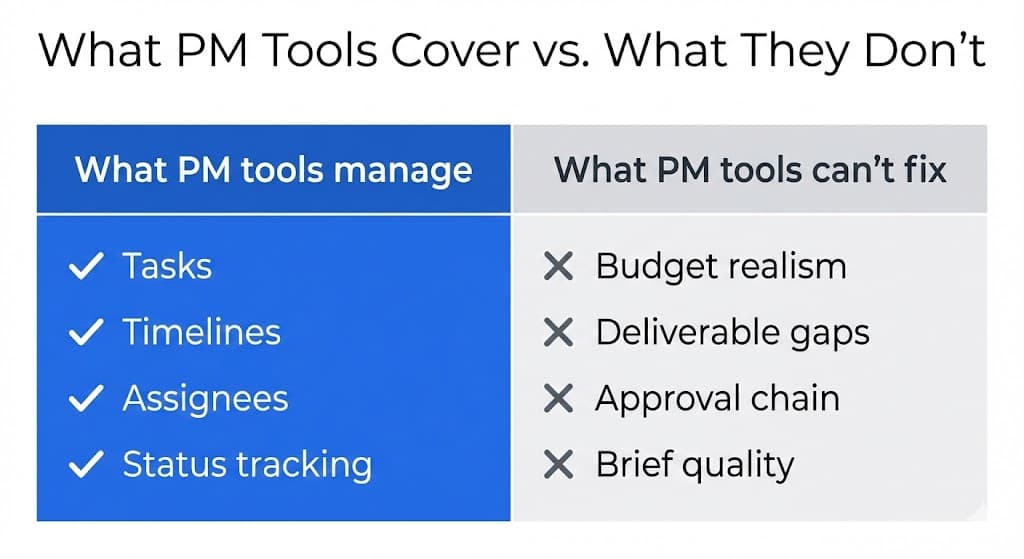
The tool gap that costs agencies projects
Project management software is built to manage execution: tasks, timelines, assignees, and status. It is very good at that. What it cannot do is validate the brief that the project is built on. It cannot tell you whether the budget is realistic, whether the deliverables are specific enough, or whether the approval chain is clear. It assumes those questions have already been answered correctly.
They usually have not. Most agencies start building in their PM tool before the brief is complete. The budget column has a number but no range. The timeline has a launch date but no content handoff milestone. The stakeholder field has a company name but not the name of the person who has final sign-off.
The PM tool faithfully tracks everything from that point forward. It just cannot fix the foundation it is tracking from.
average net margin for digital agencies since 2015, leaving almost no financial buffer when a project overruns its scope.
Source: Promethean Research, 2024 Digital Agency Industry Report →of agency leaders say projects at least sometimes come in over budget.
Source: Teamwork.com, State of Agency Operations 2023 (survey of 512 agency leaders) →of US agencies lose $1,000–$5,000 every month to unbilled out-of-scope work, revenue that enters the PM tool as hours but never appears on an invoice.
Source: Ignition, 2025 Agency Pricing & Cash Flow Report →What agency project management software actually solves
To be fair about what PM tools do well: they solve execution coordination. They give teams visibility into who is doing what, by when. They surface bottlenecks. They create accountability through assignment and deadline tracking. For agencies managing multiple projects simultaneously, a good PM tool is essential.
Linear
Best for development-forward agencies and product teams. Strong issue tracking, cycle planning, and engineering workflow. Not designed for client-facing work or brief management.
Asana
Good for larger agency teams with complex project structures. Strong at dependency tracking and portfolio views. Requires consistent process discipline to get value from, and it reflects the quality of your process, not a substitute for it.
Notion
Flexible enough to store briefs, wikis, and project tracking in one place. The flexibility is also the risk, because it is easy to end up with inconsistent project structures and no reliable way to compare project health across the portfolio.
ClickUp
High feature density. Works well for agencies that want one tool for everything. The tradeoff is complexity, and teams often use 20% of the features and feel overwhelmed by the other 80%.
| Tool | Best for | Main limitation |
|---|---|---|
| Linear | Dev-forward agencies and product teams | Not designed for client-facing work or brief management |
| Asana | Larger teams with complex project structures | Requires consistent process discipline, reflects your process, and is not a substitute for it |
| Notion | Flexibility: briefs, wikis, and tracking in one place | Easy to end up with inconsistent structures and no reliable portfolio view |
| ClickUp | All-in-one agencies | High complexity, and teams often use 20% of features |
All of these tools share the same assumption: the project is already scoped. They manage execution from that point. None of them validate whether the brief your project is built on is complete.
Why discovery is the missing layer
There is a gap in the agency workflow that no PM tool fills. It sits between the client's first contact and the project starting in the PM tool. This is the discovery phase, where a client brief is received, interpreted, and committed to. Most agencies do this ad hoc: a kickoff call, a few emails, and a brief that gets amended three times before anyone signs it.
The problem is not that agencies skip discovery. It is that discovery is unstructured. Different team members extract different information. Different clients provide different levels of detail. There is no consistent standard for what a complete brief looks like, which means there is no reliable way to know when a project is ready to start.
A structured discovery process has three outputs: a scored brief (is the information complete enough to commit?), a risk map (what will cause problems if left unresolved?), and a brief pack (the operational documents the PM tool will track from). When those three outputs exist before the project enters the PM tool, the PM tool works the way it is designed to.
When they do not exist, and the PM tool is opened before discovery is complete, the PM tool becomes a very well-organized way to track a project that should not have started yet.
How agencies use Clariva before their PM tool
Clariva sits at the pre-commitment stage, before the project enters your PM tool. When a new brief arrives, you analyze it in Clariva. It scores coverage across all relevant dimensions, flags any gaps with specific evidence and suggested next actions, and generates a brief pack: project summary, scope definition, assumptions list, and a commitment checklist.
If the brief is incomplete, Clariva tells you exactly what is missing and what to ask. You resolve the gaps through a follow-up intake sent to the client, a clarifying call, or direct editing, and then regenerate. When the coverage score is sufficient and the risk flags are resolved, the brief is ready to commit to.
At that point, the project enters the PM tool with a complete foundation. The brief pack exports to PDF or JSON (on Core plan). The scope document is ready to share with the client. The assumptions are documented. The approval chain is named. The PM tool takes it from there.
The workflow is: brief received → Clariva analysis → gaps resolved → brief pack generated → project created in PM tool. The discovery phase has a defined entry point, a defined output, and a defined exit condition. That is what makes it reproducible.
What to look for in agency PM software
If you are evaluating PM tools for your agency, the criteria that matter most are not feature lists. They are fit with how your team actually works. Here is what to evaluate:
- Client visibility: do clients need a view into the project? If yes, look for a tool with client portal features or clean external sharing.
- Template consistency: can you create project templates that enforce your standard process? Inconsistent project structures are the most common source of PM tool failure.
- Integration with your delivery stack: does it connect to your design tools, your communication channels, and your billing system? Integration friction kills adoption.
- Reporting at the portfolio level: can you see project health, resource utilization, and deadline risk across all active projects in one view?
- Adoption ceiling: will your whole team actually use it? A PM tool that half the team uses informally and half the team ignores is worse than no PM tool, because it creates an illusion of coordination.
The best PM tool for your agency is the one your team will actually use consistently. Pick the simplest tool that covers your requirements, and invest the setup time to enforce a consistent process. The tool reflects your process. Fix the process first.
Clariva validates your brief before you commit, so the project that enters your PM tool is built on a complete foundation.
Analyze your next brief before your PM tool startsFrequently asked questions
What is the best project management software for agencies?
There is no single best tool. The right PM software depends on how your agency works. Linear suits development-forward teams. Asana and ClickUp work well for larger agencies with complex structures. Notion suits teams that want flexibility. What matters more than the tool is what happens before the project enters it: a complete brief, a defined scope, and a named approval chain.
What should agencies do before setting up a project in a PM tool?
Before a project enters a PM tool, the brief should be complete and both parties should have signed off on it. That means: budget committed, deliverables named with explicit exclusions, final approver identified, and content delivery milestones documented. Opening a PM tool before these conditions are met is tracking from an incomplete foundation.
How do Linear, Asana, and Notion compare for agency work?
Linear is optimized for software development workflows with strong issue tracking and cycle planning, but it is not designed for client-facing brief management. Asana handles complex multi-project structures well but requires disciplined process adoption. Notion is the most flexible but the least structured, so it is easy to end up with inconsistent project formats. All three share the same limitation: they manage execution, not discovery.