Agency Client Onboarding Workflow Template (Free Template)
This workflow template maps onboarding into clear stages and gates so teams can start delivery with aligned scope, owners, and milestones.
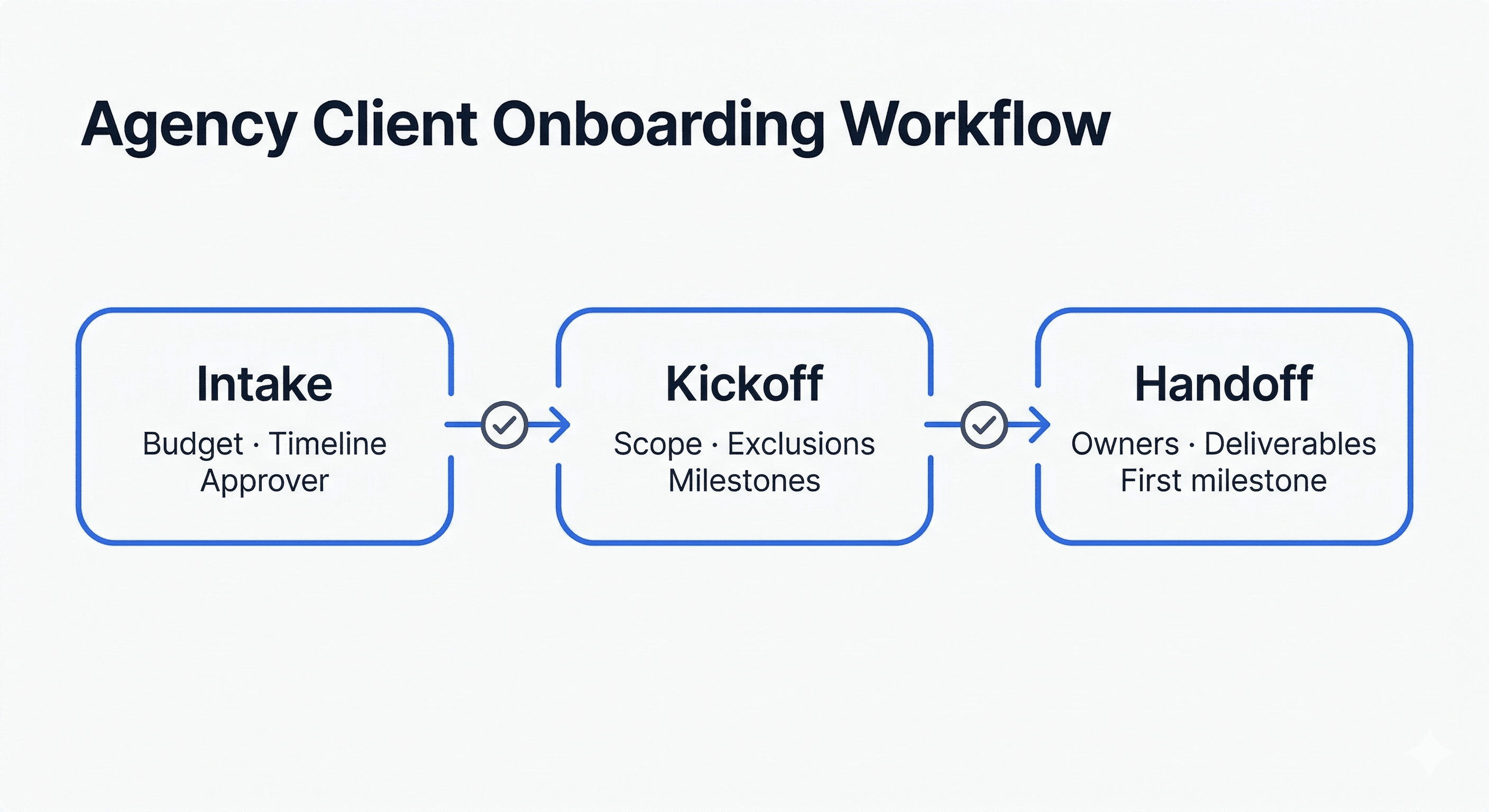
Workflow stages and gates
- Stage A: Intake validation: Gate: required inputs complete and final approver identified.
- Stage B: Kickoff alignment: Gate: scope/exclusions accepted and milestone timeline agreed.
- Stage C: Delivery handoff: Gate: owners assigned, first sprint ready, workspace fully shared.
Suggested ownership model
- Account lead owns intake completeness and approver alignment.
- Project manager owns kickoff scope review and timeline lock.
- Delivery lead owns handoff acceptance and sprint readiness.
Workflow template block
# Agency Client Onboarding Workflow

1) Intake validation
- Inputs complete
- Final approver confirmed
- Risks logged

2) Kickoff alignment
- Scope + exclusions confirmed
- Milestones approved
- Communication rules documented

3) Delivery handoff
- Owner matrix complete
- Sprint 1 plan accepted
- Client access and channels active
Recommended stage timing and SLAs
Workflow improves speed only when each gate has a service-level expectation. Without timing rules, stages become status labels instead of operating controls.
Use explicit SLAs for internal responses and approvals so delays are visible early and escalated before they affect delivery milestones.
- Intake validation SLA: 48 hours after submission
- Kickoff scheduling SLA: within 2 business days of intake approval
- Post-kickoff recap SLA: within 24 hours
- Approval response SLA: 1-2 business days per decision point
Automation rules to add to your workflow
- Auto-remind missing intake fields: Trigger reminders at 24 and 48 hours for unanswered critical fields.
- Block kickoff scheduling: Prevent kickoff from being booked until approver, budget, and timeline fields are complete.
- Auto-generate kickoff recap: Create a structured recap draft immediately after meeting notes are saved.
- Escalate stalled approvals: Notify delivery lead when approvals exceed SLA so the timeline can be re-baselined early.
How to keep workflow quality consistent
A workflow template only works if teams use it the same way. Define gate criteria in plain language and train against real examples of pass/fail onboarding states.
Use weekly workflow reviews to compare active projects. If one team repeatedly bypasses a gate, adjust either the gate design or the training, not just the project plan.
- Store one approved workflow version
- Log every gate exception with reason and owner
- Review missed SLAs in project retrospectives
- Tie workflow compliance to delivery health metrics
When to use workflow vs checklist
- Use workflow when projects involve multiple approvers and cross-functional handoffs.
- Use checklist when the project is simple and owner chain is stable.
- Use both when you need gate control plus day-to-day task tracking.
Decision rules for stalled workflow stages
- Intake stalled >48h: Escalate to account owner and pause kickoff scheduling.
- Approver unresolved at kickoff: Run kickoff as planning-only; do not lock timeline commitments.
- Handoff incomplete after kickoff: Block sprint start until recap, owners, and first milestone are confirmed.
- Approval SLA breached twice: Re-baseline timeline and issue written impact notice to stakeholders.
Frequently asked questions
What is an onboarding workflow?
A stage-based operating model with clear gates before delivery begins.
How do agencies automate onboarding workflow?
Automate reminders, owner assignments, and gate checks using standard templates.
Which tools support onboarding workflows?
Tools that support intake, approvals, task routing, and client visibility.
Skip the template. Generate it automatically.
Clariva generates this document from a brief description or existing document, scored, validated, and ready to use.